How Trust3 AI carries source policy into OneLake
TL;DR
- OneLake shortcuts expose data from source platforms such as Databricks and Snowflake in Fabric, but source permissions like Unity Catalog grants do not follow the shortcut
- Trust3 AI syncs source authorization intent into OneLake, so a user gets the same access decision on either path
- Principal mapping is automatic: Entra identities, OneLake security roles, workspaces, and shortcut identity mode resolved for you
- Continuous synchronization removes drift, manual reviews, and parallel permissions projects
- The source platform stays the source of truth while Fabric and Power BI users get governed access
- Trust3 AI complements OneLake security rather than replacing it, translating governance from any source platform into controls OneLake understands
Microsoft OneLake gives organizations a compelling way to simplify access to data across the enterprise. With shortcuts, data managed in platforms such as Databricks can be made available through OneLake without building a copy pipeline. The tables become easier to find and use inside the Microsoft ecosystem, while the underlying data stays in the platform that manages it.
This creates an important opportunity. A customer can keep data in Databricks and still make it available to teams that work in Microsoft Fabric and Power BI. OneLake becomes a common access layer across analytics environments.
But there is a gap to close before enterprises can adopt this broadly: source-platform permissions, such as Databricks Unity Catalog grants, are not automatically translated into OneLake permissions.
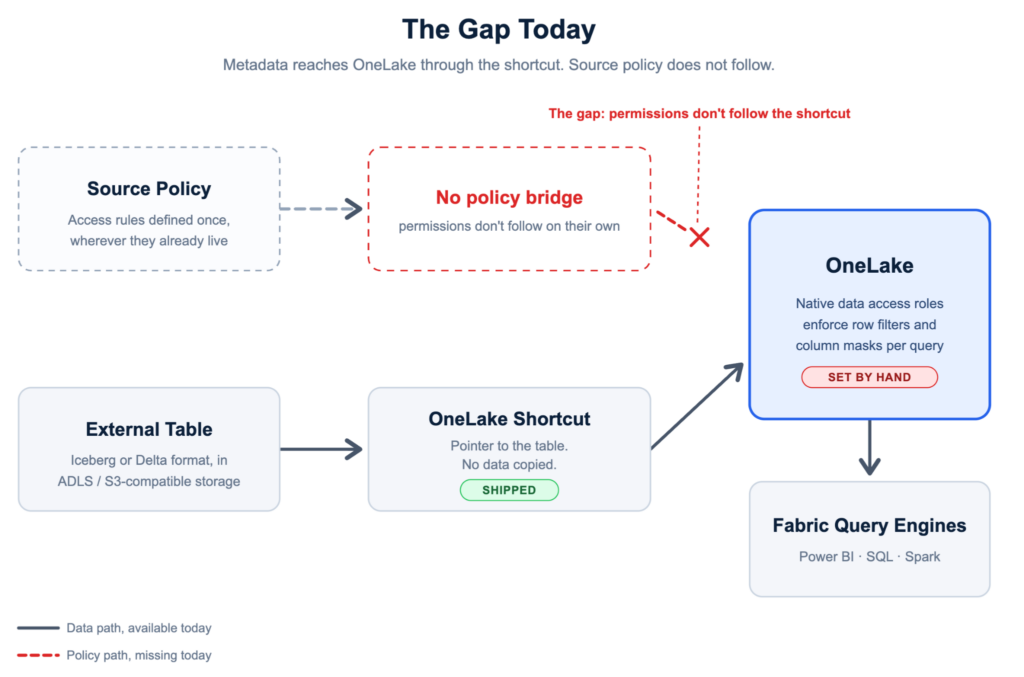
The shortcut connects the data, but not the security model
When a Unity Catalog catalog is surfaced in Fabric, its metadata becomes available in OneLake and shortcuts provide access to the underlying data. However, those source grants are not automatically converted into equivalent OneLake security roles and memberships. The same gap appears with any source platform reached through OneLake.
For customers, this creates a governance question: if a user is allowed, or not allowed, to access a dataset in the source platform, how do we ensure the same decision is enforced when that user reaches the data through OneLake?
Without a policy bridge, teams must recreate permissions manually in Microsoft Fabric. That approach is difficult to scale and even harder to keep accurate. A policy change in the source platform can leave OneLake out of date. New users, groups, workspaces, and lakehouses introduce more mappings. Over time, the two environments can drift, creating inconsistent access and unnecessary risk.
Trust3 AI fills this gap by synchronizing the authorization intent from the source platform into OneLake.
Consistent policies, regardless of the access path
With Trust3 AI, governance becomes a shared enterprise capability instead of a per-platform setup task. Policies defined in the source platform, such as Databricks Unity Catalog, are translated into the corresponding OneLake permission model and kept synchronized as those policies change.
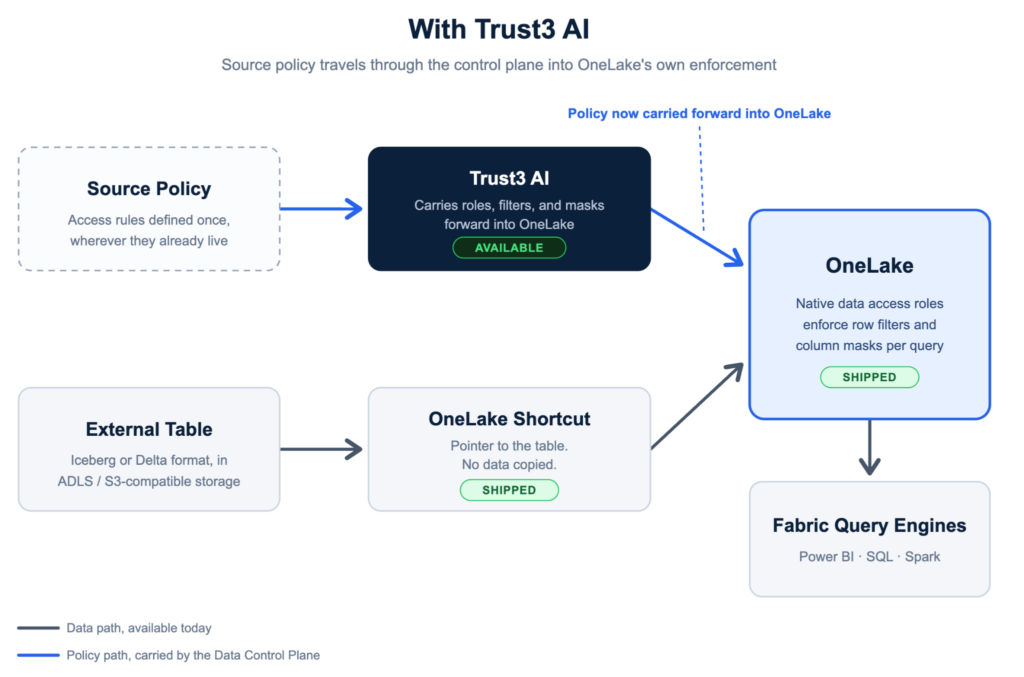
The result is simple: a user gets the same access decision whether they reach the data in the source platform or through OneLake.
A shortcut should not become a shortcut around governance. When access is granted, revoked, or changed in the source platform, Trust3 AI automatically updates the corresponding permissions in OneLake. Security teams do not need to depend on periodic manual reviews, and data teams do not need to maintain two independent policy models.
OneLake can widen access to enterprise data while preserving the controls set in the source platform.
Translating identities and permissions across platforms
Synchronizing policies is not a matter of copying a list of grants. Source platforms and OneLake represent identities, roles, and resources differently.
In Databricks, permissions may be assigned directly to email addresses or groups. In OneLake, access is commonly expressed through roles, with users and groups assigned to those roles. The same person or group must be resolved across two identity and authorization models. The resulting role assignments must apply to the correct OneLake resources.
Trust3 AI handles this principal mapping automatically. It translates source grants into the roles, users, and groups required by OneLake while preserving the intent of the original policy.
Users accessing Fabric are represented through Microsoft Entra ID, while effective access is shaped by Fabric item permissions, OneLake security roles, workspace context, and the selected shortcut identity mode.
Customers should not have to build and maintain this mapping themselves. Trust3 AI resolves the tenant, workspace, lakehouse, and resource identifiers required to apply each policy correctly.
Automatic synchronization removes operational drift
Enterprise permissions are never static. People change teams. Groups are reorganized. New datasets are published. Access is revoked. Policies evolve as regulatory and business requirements change.
A one-time migration of permissions does not solve this problem. The authorization model must remain aligned over time.
Trust3 AI continuously synchronizes changes from the source platform to OneLake. When the source policy changes, the OneLake representation is updated automatically. This reduces administrative effort. More importantly, it shrinks the window where a user could have different access depending on the tool they use.
For OneLake customers, this changes the operating model. Teams can add shortcuts and expand data availability without creating a parallel permissions-maintenance project for every new dataset.
A governed path from Databricks to Power BI
The most immediate benefit is reaching more analytics use cases.
Many organizations manage high-value datasets in Databricks while business users spend most of their time in Power BI. OneLake shortcuts make it possible to bring those datasets into the Microsoft Fabric experience. Trust3 AI makes that access governable at enterprise scale.
A customer can keep engineering and data science workloads in Databricks, govern the tables through Unity Catalog, expose the relevant datasets through OneLake, and enable business users to analyze them in Power BI. The organization gains a more integrated user experience without moving the source of truth or rebuilding authorization by hand.
This is especially valuable for enterprises expanding Fabric across business teams while keeping Databricks for data engineering, machine learning, or lakehouse workloads. OneLake becomes the governed bridge between the platforms.
The same model extends to Snowflake
The opportunity is not limited to Databricks. Trust3 AI provides a similar integration between OneLake and Snowflake, translating and synchronizing permissions so Snowflake-managed data can be reached through the Microsoft ecosystem with consistent governance.
For customers with multiple data platforms, this makes OneLake more valuable as a common access layer. Teams can make data from any source platform available to Fabric and Power BI users while retaining the policy intent defined in each source system.
Customers do not have to standardize every workload on one platform. OneLake gives Fabric and Power BI users one consumption layer across the platforms they already run.
Why this matters for OneLake adoption
OneLake already addresses a major enterprise challenge: making distributed data easier to access without creating more copies. Trust3 AI addresses the corresponding governance challenge: ensuring that easier access does not lead to fragmented permissions.
Together, OneLake shortcuts and Trust3 AI provide a practical model for cross-platform analytics. Datasets from source platforms such as Databricks and Snowflake reach OneLake without rebuilding pipelines. Existing source permissions remain the basis for access decisions, and the identity, role, tenant, workspace, and lakehouse mappings are handled automatically as policies change. Power BI and Fabric users gain governed access to data that stays managed in the source platform.
This removes one of the most important barriers to using OneLake as the enterprise access layer for data managed outside Microsoft Fabric.
OneLake can expand access without fragmenting governance
Customers should not have to choose between an integrated analytics experience and consistent data security. They should be able to use OneLake to make data broadly useful while preserving the authorization policies they already trust.
Trust3 AI makes that possible. It connects the policy models, maps the identities and resources, and keeps permissions synchronized as the environment changes.
Trust3 AI does not replace OneLake security. It makes OneLake security easier to adopt by translating the governance customers have already established in the source platform into the controls OneLake understands.
For OneLake teams and partners, the message is straightforward: customers can bring data from source platforms such as Databricks and Snowflake into the OneLake experience, enable analytics through Fabric and Power BI, and maintain consistent governance across every access path.
OneLake provides a unified data access layer. Trust3 AI ensures that permissions arrive with it.
Let’s chat further here: https://trust3.ai/demo/