Secure Microsoft Fabric Data Access
Trust3 AI syncs Databricks and Snowflake policies into native OneLake Security roles, so every Fabric user and agent gets the same access decision as the source.
“As enterprises adopt a best-of-breed data strategy, access controls cannot stop at platform boundaries.”Dipti Borkar, Vice President, Microsoft IQ and OneLake, Microsoft
OneLake Shortcuts Move the Data, Not the Policy
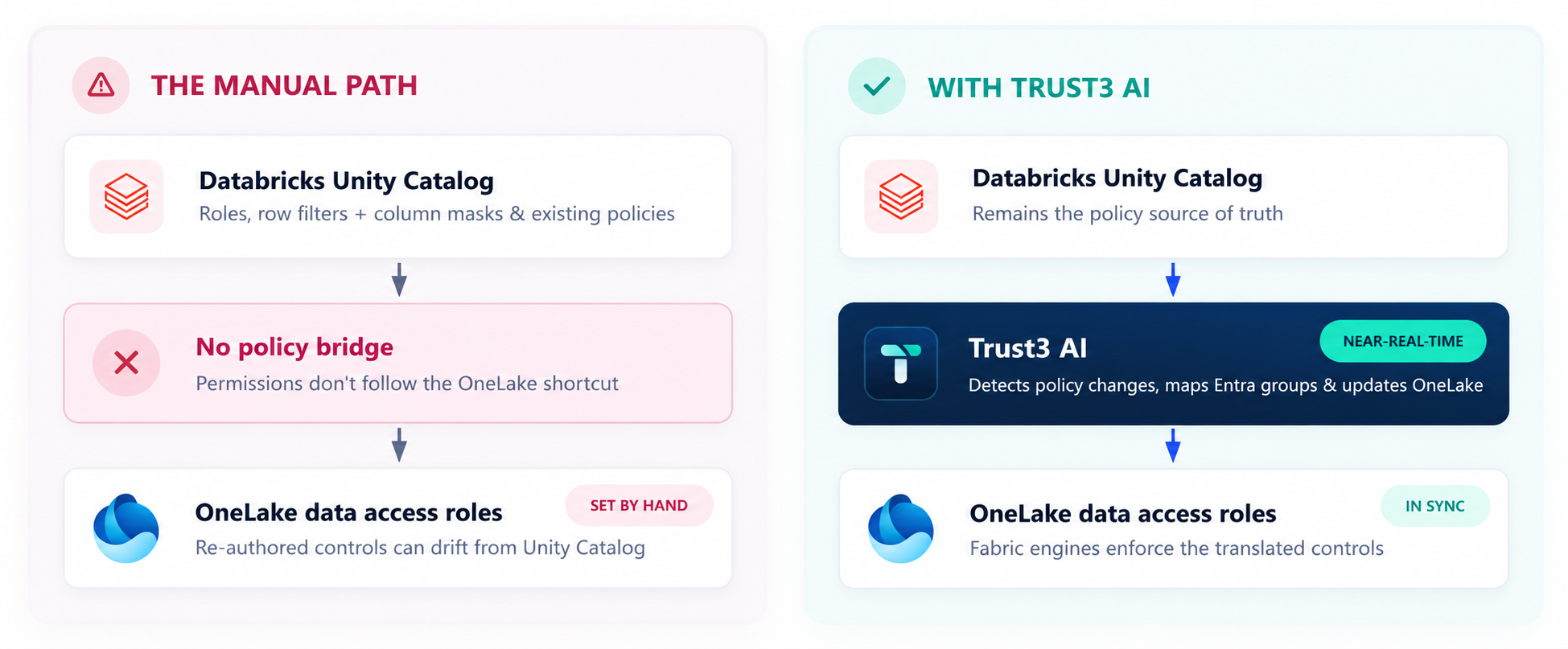
A OneLake shortcut exposes a Databricks or Snowflake table in Fabric, and a mirrored catalog syncs its metadata. Neither carries the grants, row filters, or column masks that control access.
The shortcut fails at three points
The Dropped Grant
Source platforms decide who sees which tables, rows, and columns. That decision never crosses the shortcut, so OneLake evaluates access without it.
The policy exists. OneLake never sees it.
The Hand-Built Copy
Teams re-author roles in OneLake by hand. Every new user, group, lakehouse, and workspace adds another mapping to maintain and another place for the two models to drift.
Two policy models. Both slowly wrong.
The Unbounded Agent
Fabric Data Agents and Copilot choose their own query paths. Without a synced policy, an agent inherits whatever OneLake allows, not what the source intended.
The agent reads what OneLake allows.
No Shared Language Between Two Access Models
Take one rule: the finance analysts group can read the orders table. In Unity Catalog, that is one grant. The group gets SELECT on the table, and the privilege also inherits from the parent catalog and schema. In OneLake, the same rule takes three linked objects, resolved per workspace: a security role scoped to the table’s path, the permissions that role holds, and the group assigned as a member.
Databricks Unity Catalog
One grant names the principal and the objectPrivileges also inherit down from the parent catalog and schema.
OneLake
Three linked objects, resolved per workspaceMembership must match one to one. Nested groups are not resolved.
Copying the grant fails at four points
Principal
Databricks users and groups must resolve to exact Microsoft Entra ID principals. OneLake membership matches one to one, and nested groups don’t resolve across a shortcut.
Resource Path
A grant names a table. OneLake needs a path inside a specific lakehouse and workspace, and the grant never contains it.
Item Permissions
OneLake checks access at the workspace, the lakehouse, and the role. All three must line up.
Identity Mode
The shortcut’s identity mode decides whose identity reaches the data. Set it wrong and OneLake evaluates the role against the wrong user.
All four change independently. A one-time mapping goes stale the week after it ships, and it’s hard to tell which part changed.
A Complete Path for Data and Policy
Databricks and OneLake read the same files in ADLS. The shortcut carries the data path. Trust3 AI carries the policy path, so both platforms make the same access decision on the same data.
POLICY PATH
DATA PATH · POLICY GOVERNS AND ENFORCES
OneLake connects your teams to the data. Trust3 AI makes the policy follow.
Grant at the Source
An admin grants, revokes, or changes access in Unity Catalog or Snowflake. The source stays the system of record.
Detect
The Trust3 AI source connector observes the change and sends it to Trust3 AI Sync.
Translate
Trust3 AI maps the grant to the mirrored resource in OneLake and resolves the Entra ID principal, workspace, lakehouse, and identity mode.
Enforce Natively
The OneLake connector upserts a OneLake Security role with the equivalent grant. Fabric’s own engines enforce it across Power BI, SQL, Spark, Fabric Data Agents, and Copilot.
Policy That Travels With the Catalog
Native OneLake Security Roles
Table grants, row filters, and column-level security become OneLake Security roles. Nothing to re-author.
Continuous Change Detection
Trust3 AI continuously detects policy changes and updates OneLake without a batch replication window.
No Proxy in the Query Path
Fabric’s security and query engines enforce every request. Trust3 AI never sits between your users and the data.
One Source of Truth
The source platform stays authoritative. Trust3 AI tracks sync status and records audit evidence for every change.
“Maintaining a consistent security posture across OneLake, Databricks, Snowflake, and every access path is essential to giving people and AI agents the freedom to work with data without compromising governance.”Dipti Borkar, Vice President, Microsoft IQ and OneLake, Microsoft
One Security Model for Every Microsoft Data Service
OneLake is the newest enforcement point. Trust3 AI already enforces policy natively across the rest of your Azure estate.
Extend the Same Boundary to Your Agents
Fabric Data Agents and Copilot query OneLake on a user’s behalf, so synced policy sets what they can read. What an agent does next, which tools it calls and where it sends results, needs controls of its own.
Trust3 AI discovers, observes, and secures agents across Copilot Studio, Microsoft Foundry, and Microsoft 365 from the same control plane that syncs your data policy.
