AI Agent Security Tools: A Practical Buyer’s Guide
Early AI security tools focused primarily on the model layer, filtering prompts and responses to detect unsafe content and sensitive information. However, securing AI agents requires additional controls, as they can invoke tools, execute code, read and write data, and delegate tasks to other agents. These capabilities introduce new attack surfaces: a malicious instruction can cause an agent to perform an unauthorized action rather than simply generate an unsafe response.
A variety of AI security tools have emerged that can be grouped into four categories: adversarial testing, tool and configuration scanning, runtime isolation, and the agent security control plane.
This article explores these four categories of AI agent security tools in the order you typically come across them during an agent’s implementation lifecycle, which spans development, testing, staging, and runtime. You will also learn about the popular tools for each category:
- Promptfoo for adversarial testing
- Snyk Agent Scan for tool and configuration scanning
- E2B for runtime isolation
- Trust3 AI for the control plane
The control plane is a core layer of modern AI agent security posture management that discovers agents across supported environments, enforces policy from build time through runtime, and maintains an audit trail, addressing the gaps left by the other three categories.
By the end of this article, you should be able to identify the threats your AI agents face and the tools you can use to secure your AI application.
Summary of Desired AI Agent Security Tools Features
| Desired Feature | Description | Representative Tools |
|---|---|---|
| Adversarial testing before deployment | Generated prompt injections, jailbreaks, and tool-abuse cases are fired at your agent as part of the continuous code delivery process, so you find any weaknesses before the code is deployed. | Promptfoo |
| Tool and MCP supply-chain scanning | The MCP configs and tool descriptions your agent trusts are checked for tool poisoning, rug pulls, hidden instructions, exposed secrets, and over-permissive settings before the agent loads them. | Snyk Agent Scan |
| Isolated execution for agent code | The agent’s code and tool calls run inside an isolated environment, so a compromised action cannot directly access the host or other workloads. Outbound internet access is on by default and can be restricted through configuration. | E2B |
| Agent security control plane |
| Trust3 AI |
What AI Agent Security Tools Protect Against
Security is particularly important for an AI agent because it does not just produce text: it reasons, decides, acts, and adapts, calling tools, running code, reading and writing data, and handing work to other agents.
A text generator can produce incorrect or harmful information. On the other hand, if an agent gets it wrong, the result can be an unauthorized action that you cannot take back.
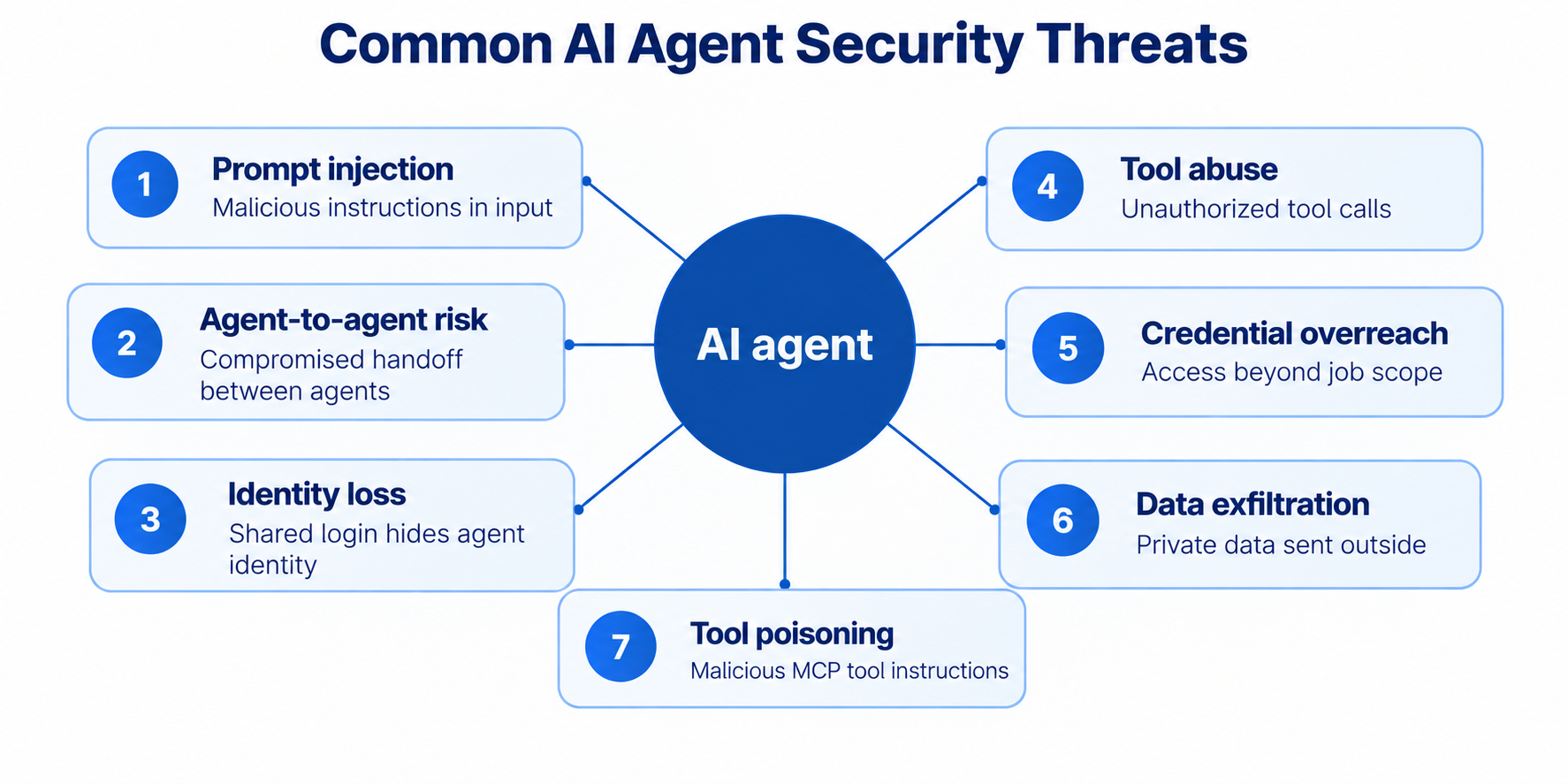
Common AI agent security threats per the OWASP GenAI Security Project’s Top 10 for LLM Applications and Top 10 for Agentic Applications.
Prompt Injection
Prompt injection is a major threat to AI applications, which is why OWASP ranks it first on its list of threats to AI and LLM applications.
It involves placing malicious instructions in content an AI agent processes. Since the model cannot reliably distinguish instructions from ordinary text, it can take unauthorized actions based on malicious instructions.
Prompt injection can be direct through a user prompt or indirect through a tool’s description, a retrieved document, or another agent’s output.
Tool Abuse and Excessive Agency
Tool abuse refers to an agent calling an unauthorized tool for a specific task. For example, an attacker may steer a customer support agent to call a refund tool to issue a refund when the agent was supposed only to call the refund information tool and pass the information back to the user.
Excessive agency is an underlying architecture problem that enables tool abuse. The agent has been given more capabilities than its job requires, such as access to too many tools, overly powerful tools, or the freedom to act without human oversight.
Credential Overreach
An agent works with real credentials, such as an API key or a database login, and can access anything those credentials can access. For example, a reporting agent may have exactly the right read-only tool. However, if it has been given database login credentials that can also read the payroll table and every customer record, a hijacked request can access all of it. OWASP’s Non-Human Identities Top 10 treats credential overreach as a separate class of risks.
Data Exfiltration
Data exfiltration involves an agent sending your system’s private data to an unauthorized external system. Data exfiltration results from the “lethal trifecta” when an AI agent can:
- Access private data
- Read untrusted content
- Exfiltrate data.
When all three are true at once, a simple prompt injection can read your secrets and send them out, with no software vulnerability involved.
Identity Loss Between the Agent and the Data
Identity loss occurs when many agents access a backend system, such as a database, an internal API, or a SaaS application, using shared credentials. The system then sees only that shared credential. The system does not see which agent is asking, for which user, or for what purpose.
Without that identity, the system cannot refuse a request it should refuse, because it cannot tell who is really behind it. This identity loss can contribute to the “confused deputy” problem in which an agent is manipulated into misusing its legitimate authority.
Poisoned Tools
AI agents can access external tools via shared protocols, such as the Model Context Protocol (MCP). Each tool comes with a text description that the agent reads and trusts. An attack called “tool poisoning” hides malicious instructions in the description.
A tool can also pass review and then be quietly updated to behave maliciously later, a tactic known as a “rug pull.” A third case is an insecure server configuration, such as an MCP server that accepts requests without authentication or runs with broader permissions than its tools need.
These security issues have already been reported in production environments. The postmark-mcp npm package was found to add a hidden BCC address that copied users’ outgoing emails to an attacker, demonstrating a real-world malicious MCP server distributed through a public registry. The Shai-Hulud worm, which copies itself from one project to the next, also demonstrated the risks of software supply-chain attacks by spreading through compromised npm packages and developer environments.
Agent-to-Agent Risk
Multiple agents work together in an agentic AI application, communicating with each other and handing work from one agent to another. During this communication, the agents’ identities and the task’s purpose can be lost, so a later agent no longer knows who the work is for or why.
An agent in the chain can be compromised the same way a single agent is, for example, through an injected instruction in a document it retrieved. The compromised agent then passes the attacker’s instructions to the next agent as an ordinary task, and the next agent carries them out with its own tools and access because it has no record of who originally asked.
Different categories of AI agent security tools address these threats.
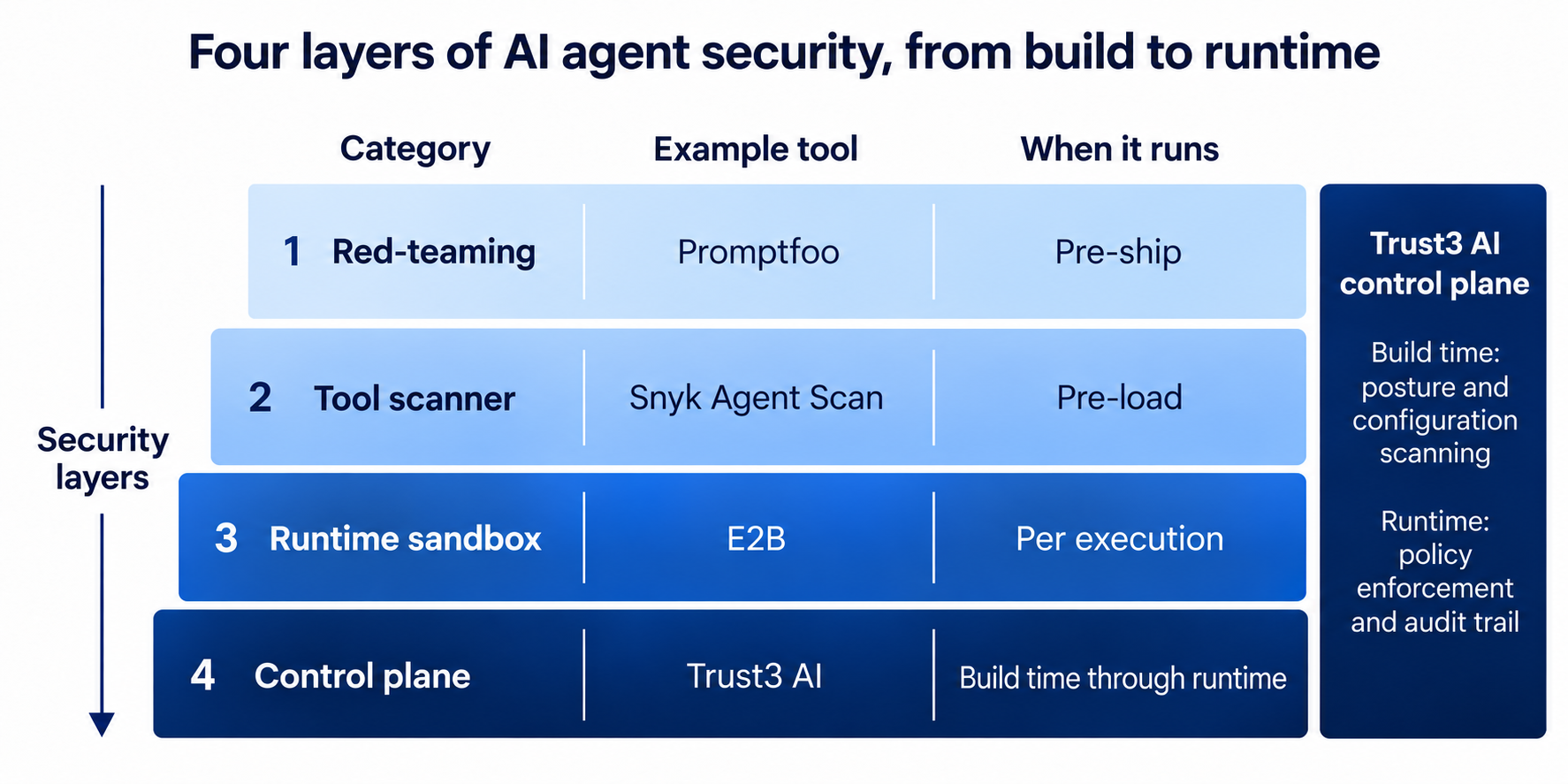
Layers of AI agent security and representative AI security tools
Category 1: Red-teaming Tools that Test the Agent Before It Ships
NIST’s Generative AI Profile defines AI red-teaming as a structured exercise to probe a system for flaws and lists it as a risk-management action. Red-teaming tools attempt prompt injection, jailbreaks (pushing the model to break its own safety rules), PII leakage, and tool-level failures such as broken authorization and excessive agency. They attempt to find weaknesses before deployment so they are fixed before production.
Promptfoo, NVIDIA Garak, and Microsoft PyRIT are some of the most widely used red-teaming and adversarial testing tools.
Promptfoo is an open-source (MIT) command-line tool for LLM and agent red-teaming, config-driven, and built to run locally and in CI. OpenAI announced its acquisition of Promptfoo in March 2026 and stated that it would remain open source under its current license.
Promptfoo generates adversarial cases and runs them against your agent through an HTTP endpoint or a function hook. Its agent-aware plugins test vulnerabilities related to authorization, agency, and injection, not only unsafe text.
The authorization plugins, e.g.,
- RBAC (role-based access control) checks that the agent respects role boundaries.
- BOLA (broken object-level authorization) checks that it cannot be tricked into reading another user’s data.
- BFLA (broken function-level authorization) checks that it cannot be tricked into calling a function it should not.
The plugins also test for excessive agency, tool discovery, and indirect prompt injection. Your team defines tests in a config file where you specify the target, vulnerability types, and attack strategies. These range from single-shot injections to multi-turn escalation.
The output is a report that groups findings by vulnerability type and severity. For each finding, it records the attack that got through, the agent’s response, and the OWASP category it maps to.
Red-teaming tests if an agent breaks in response to an input. It is a point-in-time test and cannot continuously detect or block security threats during production runtime. So a clean scan on Monday says nothing about a prompt-injected document that the agent reads on Tuesday.
Category 2: Scanners that Vet the Tools Your Agent Trusts
Several security tools scan for agent tool poisoning. Snyk Agent Scan, Cisco AI Defense MCP Scanner, and MCP-Shield inspect MCP servers and their tool descriptions, and NVIDIA SkillSpector inspects agent skills.
You can run Snyk Agent Scan with one command: “uvx snyk-agent-scan@latest”. It scans AI agent config files to identify which MCP servers and skills are wired in, then launches each to retrieve its tool descriptions. It checks both servers and descriptions for tool poisoning, prompt injection, and cross-server shadowing, in which one server’s tool impersonates a trusted tool on another. Because it reads the config, not just the descriptions, it can still detect a potentially malicious server that is attached but not yet called.
However, there are four things to watch out for when using Snyk.
- It sends your configs and tool descriptions to Snyk’s API after redacting detected secrets. You should still review the information being sent when scanning sensitive configurations.
- To read a server’s tools, the scanner has to start that server, which runs the server’s own code. When you scan a config you don’t trust, run the scanner in an isolated sandbox with restricted filesystem and network access, limiting what a malicious server can reach on your system.
- A scan checks a tool at a point in time. It cannot stop a rug pull that updates the tool mid-session.
- A scan can’t see what the agent does with a tool once it passes. Vetting happens before the run, but agents can still fail at runtime.
Category 3: Sandboxes that Contain What the Agent Executes
Sandboxes and isolated execution environments treat the output of the AI model powering the agent as untrusted. The output is text, and it can contain executable code, such as a shell command that an injected instruction led the model to write. If a program passes that text directly into a shell, exec, or eval without proper checks, the system may execute it as code.
OWASP calls this improper output handling, and it can lead to remote code execution, letting an attacker run their own commands in your environment. They could read or delete files, steal secret keys and credentials, or reach other systems on the internal network. For this reason, OWASP treats a model’s output as untrusted by default.
A sandbox isolates the code execution, limiting how much damage an attack can cause. E2B, Modal, and Daytona are some of the tools that run agent code inside isolated sandboxes.
E2B is an open-source (Apache 2.0) sandbox provider built into OpenAI’s Agents SDK. The E2B runtime creates a sandbox, runs the code inside it, and destroys it when it is no longer needed, while network access can be restricted through configuration.
Each E2B sandbox runs on a Firecracker microVM, which is a lightweight virtual machine with its own guest kernel. A container shares the host kernel, so a kernel exploit inside a container can reach the host. A microVM has a much smaller escape surface, which is mainly the hypervisor boundary and a small set of emulated devices.
A sandbox isolates an agent’s execution, but it does not decide what the agent is allowed to do. It doesn’t know which agents are running within an organization, and it doesn’t check each agent’s actions against defined authorization policies. A sandbox controls where code runs, not whether a specific tool call, network request, or data read should be permitted. The control plane decides what each agent can do.
Category 4: The Agent Security Control Plane
The first three categories each solve one security problem.
- Red-teaming tests an agent before it ships
- Scanners vet agent accessible tools before they load
- Sandboxes isolate its code while it runs.
None of them track your agents across their lifecycle or check whether an agent’s actions should be allowed. That is what an agent security control plane does. It answers the four questions whenever an agent acts: who initiated the action, what it is trying to reach, whether it is authorized, and where the decision is enforced.
A control plane is a single layer that sits above AI agents across an organization’s supported environments. It has three major capabilities.
- Discovers the agents running on the platforms it connects to, including agents nobody registered.
- Records what those agents do at runtime in an audit trail.
- Enforces organizational policies by checking each agent’s actions and blocking those that break a rule.
Trust3 AI is an agent security control plane that covers AI agents from build time to runtime, including pre-deployment posture and configuration scanning, and pairs agent-side controls with access enforcement at the data source.
How Trust3 AI Implements the Agent Security Control Plane
Trust3 AI implements agent security through three actions: discover, observe, and secure. Discover finds agents across supported cloud environments and frameworks. Observe records what each agent does. Secure applies policy to an agent’s actions through agent security, MCP security, and agent-to-agent security. Trust3 AI also enforces access policy at the data source itself, so a request that passes the agent-side checks can still be refused where the data lives. The rest of this section explains each feature in detail.
Agent Discovery
Gartner predicts that by 2028 an average global Fortune 500 enterprise will have over 150,000 agents in use, up from fewer than 15 in 2025. The Cloud Security Alliance reports that machine identities already outnumber humans 45:1. It also finds that 51% of organizations have no clear owner for them, and that 1 in 20 carries full admin rights.
Asset inventory is the first CIS Critical Security Control because you cannot protect an asset you don’t know exists. The same is true of AI agents. Unregistered “shadow agents” may have excessive permissions and no security oversight.
Trust3 AI’s Agent Discovery feature maintains a live inventory across connected clouds and supported frameworks, helping identify shadow agents. For each agent, it records what the agent can reach, who owns it, and a Trust Score for its risk.
Agent Observability
An audit trail is a security control, not just an operational convenience. A control plane records what an agent does at runtime. It is where a poisoned tool or injected instruction shows up, and where earlier tests and scans never looked.
Trust3 AI Agent Observability traces what connected agents do, including the tools they call, the data they reach, and the policy decisions made along the way. It also:
- Maps what each agent connects to
- Tracks cost and token use
- Flags when an agent is used for something it was not meant to do.
Agent Security
Models are unreliable at knowing when not to act. The AgentAbstain benchmark pairs each task that an agent should carry out with a near-identical version in which the agent should not act, for example, because the request is ambiguous, the constraints conflict, or a tool fails. The benchmark gives credit only when the model handles both versions correctly. The best of 17 models scores 59.5%, and the average is 45.7%. None of these tasks involves an attacker. A model that cannot reliably tell when not to act on an honest request should not decide whether its own actions are allowed. That decision has to be made outside the model.
The control plane decides what an agent can do, and an enforcement point applies that decision. A control plane’s policy is usually enforced in two places. The first is a gateway on the agent’s path to models and tools, which allows or blocks a call. The second is the data platform, which evaluates access inside its own engine and limits what each query can return.
In most deployments, the gateway is an existing third-party gateway, not one that the control plane provides. Examples include Amazon Bedrock AgentCore Gateway, Google’s Agent Gateway on its Gemini Enterprise Agent Platform, and gateways such as Kong, LiteLLM, and Cloudflare.
Trust3 AI agent security does not replace the existing gateway. Instead, it applies policies to the gateway in one of two ways, depending on what the gateway supports.
- For gateways that allow remote policy control, Trust3 AI pushes its rules down for the gateway to enforce.
- For gateways that also allow custom hooks, Trust3 AI installs its own checks that run before a tool call.
Either way, each request passing through the integrated enforcement point is checked against the active policy when it is processed and blocked if it violates a rule.
For example, an agent requesting a list of email addresses is denied while a rule against sharing personal data is active. Access is tied to why the agent is running. The purpose the agent declared at registration is an input to the policy check, so what the agent may do depends on both its role and its current task.
Grants are just-in-time and expire automatically; a kill switch can stop a misbehaving agent, and detected violations become assignable issues, each with a suggested fix and an owner.
MCP Security
A pre-load scan (as explained in category 2 of the tools) checks a tool once, before it loads. The runtime counterpart decides, when the agent calls a tool, whether that call is allowed. Decisions are based on a per-agent allowlist of servers, a check on each server, and short-lived tokens rather than persistent credentials.
Trust3 AI MCP Security scans the MCP servers and tools an agent connects to before deployment, and enforces these checks at runtime on MCP calls routed through its supported integrations.
Agent-to-Agent Security
When one agent hands off work to another, the original identity and purpose can get lost along the chain, and a compromised agent can corrupt downstream agents. Google’s Agent2Agent protocol provides a standard for cross-vendor agent communication and delegation. OWASP also identifies insecure inter-agent communication as an AI agent security risk.
Trust3 AI A2A Security is designed to carry the original identity and purpose between agents in supported execution chains. It lets each step narrow what is allowed, preventing a downstream agent from gaining more access than the originating request permits when controls are correctly enforced.
As explained in the threats section, when many agents share a single login to a data source, that source sees only the shared login, not which agent is actually behind a request. It cannot limit what any single agent reads, so each agent can reach everything the login allows. The Cloud Security Alliance documents this failure. The fix is to make the access decision at the data source, using each agent’s real identity instead of a shared login.
Data Access
Trust3 AI Data Access enforces access policy natively at the data source, with no proxy in the path. It carries the agent’s identity and declared purpose to the source, so the source can decide whether the action can be performed, depending on who is asking and why. The gateway governs what an agent does while data access governs what it can reach. This is why securing the agent alone is incomplete. A gateway can approve a call to an allowed SQL tool without seeing that the query reads the payroll table. Only the data source sees which records a request touches, so the final access decision belongs there.
What a Control Plane Does Not Do
A control plane is not a substitute for red-teaming tools, nor does it sandbox the code the agent runs. Those are different capabilities handled by the tools mentioned in categories 1 and 3. Control plane capabilities are also bounded by what it can integrate with. Enforcement happens at gateways and data sources, so an action that crosses no integrated enforcement point cannot be blocked.
Recommendations for Choosing AI Agent Security Tools
The four categories of AI agent security tools are not competing choices. They cover different threats at different points in an AI agent’s lifecycle. The following recommendations show how to choose tools across the four categories and combine them so that each threat in this article has a tool that addresses it.
Select a Tool for Each Threat Category
AI agents face a myriad of threats, and no single tool can defend against them all. Select a tool for different types of attacks, e.g., a red-teaming tool to find prompt injection and jailbreaks before release, a scanner to catch poisoned tools and unsafe configs as they are wired in, a sandbox to contain the code the agent runs, and a control plane to secure agents from build time through runtime, covering threats such as tool abuse, data exfiltration, unauthorized data access, and identity loss.
Re-run Pre-ship Tools on Every Change
Red-teaming and tool scanning are point-in-time AI agent security assessments. Once an AI agent, its tools, skills, or associated configurations are updated, the previous test and scan results may no longer be valid. Always re-run the relevant tests and scans after each update. Sandboxing, however, provides isolation during execution and should remain enabled whenever the agent runs untrusted code.
Keep Runtime Policy, Audit, and Identity in One Control Plane
You can run discovery, observability, runtime enforcement, and data-access control as separate tools or from one control plane. A single control plane gives you one policy model, so a rule such as “support agents may not read customer payment data” is written once and applied at both the gateway and the data source. It also gives you one audit trail that links an agent’s tool call to the data that the call read. Finally, one identity is carried across agent handoffs, so a step late in the chain can still be checked against the user who started the request.
Choose a Control Plane that Registers Agents Before They Ship
Select a control plane that registers vital agent information before the agent goes to production. The control plane must assign each agent an owner, a purpose, the data it can access, the rules it must follow, and a trust score that reflects the agent’s assessed security risk. A control plane that only acts at runtime leaves the build-time half open, and allows an unregistered agent to become a shadow agent.
Check What a Tool Can Reach Before you Adopt It
A control plane sees and acts only on the agent actions that reach the gateways, data platforms, and agent platforms it integrates with. Similarly, a scanner may only scan a limited number of tool sources. Always confirm what a tool can reach in your AI agent stack, note what it cannot see, and close the gap with another tool.
Secure the Data Your Agents Access
Agent-side controls decide which tools an agent can call, but they don’t see what data a call returns. Only the data source can see which records a request touches, so enforce access policy on data as well, based on which agent is asking rather than on a shared login. If an attacker hijacks an agent or finds a gap in your gateway rules, data access control can still deny the attacker.

A control plane that secures agents
& everything they touch
-


Discover every AI agent and shadow agents across your clouds and applications
-

Secure agent lifecycle with Trust Score gating, purpose-based access control & runtime guardrails
-

Control the MCPs, tools, APIs, and data every agent touches with pre-built integrations
Final Thoughts
AI security tools have evolved to address the risks introduced by AI agents. The first tools filtered prompts and responses, which fit a model that only produced text. An agent calls tools, runs code, and reads and writes data, so AI agent security tools must control what the agent can do and what it can reach when it acts.
Red-teaming tests the agent before release, scanners vet the tools an agent trusts, sandboxes contain the code an agent runs, and a control plane secures the agent from build time through runtime.
A control plane like Trust3 AI follows an agent from registration through runtime execution, discovers agents across supported environments, records their activities, and enforces policy at integrated runtime checkpoints.
Explore Trust3 AI to discover, observe, and secure your AI agents from one control plane.